
How to Get TIN ID Online -Requirements, Application Process and Fees

Obtaining a TIN ID is a simple process once you know the steps. Here’s a complete guide on how to apply for a TIN ID — either online or directly at your RDO office — to register as a taxpayer with the Bureau of Internal Revenue (BIR), Department of Finance, Philippines.
There are two types of TIN IDs: the physical TIN ID card and the digital TIN ID card. While they may look different, both are equally valid across the Philippines.
In this guide, I’ll walk you through the process of getting both a physical TIN ID and a digital TIN ID in simple, easy-to-understand terms.
What is TIN ID?
TIN stands for Taxpayer Identification Number — a unique number issued by the Bureau of Internal Revenue (BIR) through its Online Registration and Update System (ORUS) or Revenue District Office (RDO). The BIR issues TIN IDs for both individuals and non-individuals, such as companies and business organizations. The issuance of the Digital TIN ID via ORUS [Online Registration and Update System] is part of the BIR’s continuous efforts to pursue digital innovation to improve the delivery of taxpayer service
While the main purpose of a TIN or TIN ID is for tax-related matters, many government agencies and financial institutions now also accept it as a valid form of identification.
What Information Does TIN ID Include?
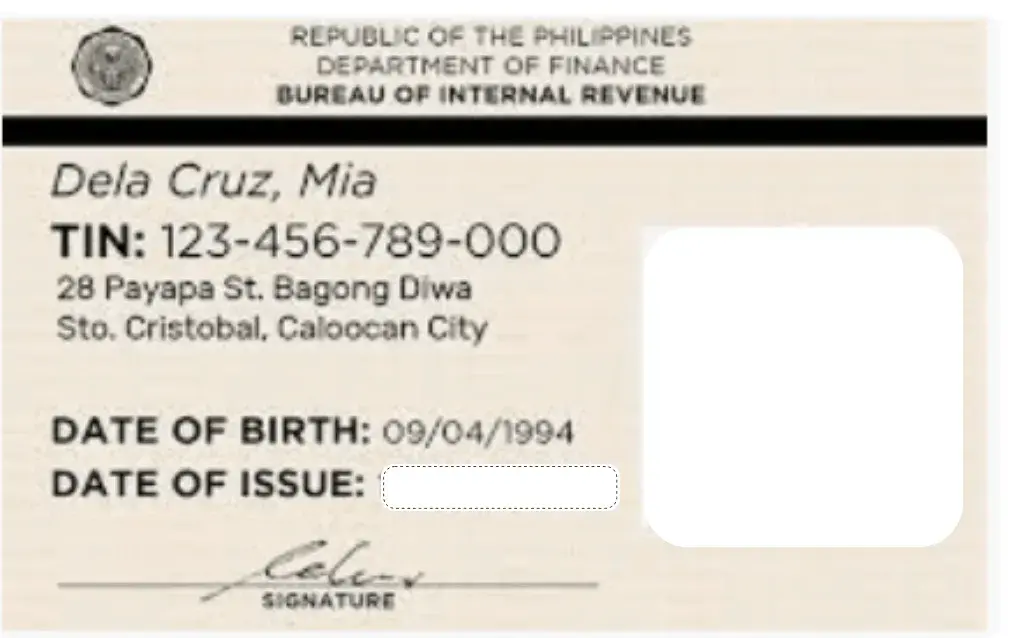
TIN ID includes name, date of birth, address, TIN number, date of issuance, photo, and signature. The new physical TIN ID and digital TIN ID also feature a unique QR code, allowing government agencies and other institutions to validate and verify your TIN ID.
Sample of TIN ID
The conventional TIN ID card has a yellowish hue, while the new TIN ID card features a greenish appearance. Both cards are designed in a horizontal format. Below, you’ll find samples of both the conventional and new TIN ID cards for your reference.

How to Apply for TIN ID Offline In-person
You cannot apply for a TIN ID in person at just any RDO office. You must visit the RDO that has jurisdiction over your city or town, as assigned by the Bureau of Internal Revenue (BIR) in the Philippines.
To find out which RDO you should go to, you can contact the BIR helpline or email address provided below.
* BIR Helpline Number – 8538-3200,
* BIR Helpline Email: [email protected]
You can follow the steps explained below to apply for TIN ID in-person at an RDO office.
Here’s how you can apply for your TIN ID:
* Call BIR Helpline at 8538-3200 to find out which RDO office covers your city or jurisdiction.
* Visit the BIR website’s Contact Us page.
* Click on Regional/District Offices under the directory section.
* Search for your city or region and click on the (+) button to view details.
*Note down the address of your respective Regional District Office (RDO).
* Go to your RDO and meet with a service executive.
* Request the appropriate BIR application form.
* Fill in the form with the required details and submit it alongside your documents and a photograph.
* Pay the applicable fee, if any.
* Your TIN ID may be issued the same day or within 1–3 working days.
* Once ready, return to the RDO to collect your TIN ID.
* Sign the TIN ID Card and affix your 1×1 photograph in the designated box.
This is how you can register as a taxpayer and apply for your TIN ID Card at your respective RDO office.
What is Digital TIN ID?
The Digital TIN ID is a new, convenient option for both individuals and businesses in the Philippines. Launched by the Bureau of Internal Revenue (BIR) on November 21, 2023, through its Online Registration and Update System (ORUS), it serves as a valid alternative to the physical TIN ID card — allowing taxpayers to get their Digital TIN ID online without needing to visit the BIR office or wait in long lines.
Sample of Digital TIN ID
The Digital TIN ID Card is designed in a vertical format and includes a QR code, allowing government and private agencies to scan and verify its authenticity. Below is a sample of a BIR Digital TIN ID Card for your reference;

How to Get Digital TIN ID Online?
To apply for a Digital TIN ID online, first register yourself or your business on the BIR ORUS web portal. Once registered, you can log in, submit your application, and pay any applicable fees along with the required documents. If you’re already registered, simply log in to update your information and apply directly. Here are the step-by-step instructions for obtaining your Digital TIN ID online:
Taxpayer Registration at BIR ORUS Portal
Here’s how to register on the BIR ORUS web portal:
– Visit orus.bir.gov.ph.
– Click on the New Registration section.
– Select whether you are an Individual or Non-Individual.
– Review the requirements and click Create An Account.
– Accept the Terms & Conditions and select Register as Taxpayer.
– Choose With Existing TIN if you already have a TIN, or Without Existing TIN if you do not.
– Select your User Type (Filipino Citizen, Filipino Overseas Worker, or other) and fill in the required information.
– Complete your profile and save it to finish the registration process.
Login & Apply for TIN ID Online at BIR ORUS Portal
Once you’ve finished registration, you’re ready to log in to ORUS and apply for your Digital TIN ID online.
– Visit the ORUS BIR web portal at orus.bir.gov.ph.
– Click LOGIN in the upper right corner.
– Enter your email and password, complete the CAPTCHA, and click Login.
– Select View Your Digital TIN ID.
– Review your details and follow the instructions.
– Upload a recent 1×1 photo with a white background (without borders).
– Confirm to accept the terms and conditions, then click Confirm to generate your Digital TIN ID.
– Return to ORUS Home and select Get Your Digital TIN ID from the left-side menu.
– Click Get Your Digital TIN ID at the bottom of the page.
– Your Digital TIN ID will appear on the screen — you can view both the front and back — and you can download it to your device.
This way, you can register as a taxpayer and apply for your Digital TIN ID directly through the ORUS BIR website.
TIN ID requirement
The Bureau of Internal Revenue (BIR) requires a completed application form and certain documents when applying for a TIN ID in the Philippines. Make sure you’re aware of the BIR’s requirements, as they vary depending on your applicant category. Here’s a list of the documents and requirements for each category:
Mandatory Documents
BIR Form No. 1901
A valid government-issued ID (such as PhilID, ePhilID, Passport, Driver’s License, or eDriver’s License) that includes your name, address, and birthdate. If your ID doesn’t show your address, you must provide additional proof of residence or business address.
For regulated professionals (with PRC license): a valid PRC ID and a government-issued ID with your address, or proof of residence or business address (one photocopy).
BIR-printed invoices or a clear sample of principal invoices.”
Other Documents (If Applicable)
If represented by someone else: Special Power of Attorney (SPA) with authorization details, plus IDs of both the taxpayer and representative (with specimen signatures).
DTI Certificate (for business name) — if applicable.
Work Visa (9g) for Foreign Nationals.
Service Contract stating income payments (for Job Orders or NGAs, LGUs, GOCCs, and GFIs).
Franchise Documents (like Certificate of Public Convenience) for Common Carriers.
BMBE Certificate of Authority for Barangay Micro Business Enterprises.
Proof of Registration or Permit to Operate (with BOI, PEZA, BCDA, TIEZA, SBMA, etc.).
Make sure to submit these additional documents only if they apply to your application.
For Individuals Earning Purely Compensation Income:
For Local Employees:
BIR Form No. 1902
A valid government-issued ID (such as PhilID, ePhilID, Passport, or Driver’s License) that shows your name, address, and birthdate. If your ID doesn’t show your address, provide additional proof of residence or business address.
For Foreign National Employees (Expatriate Residents):
BIR Form No. 1902
Passport (with bio page, entry, and departure stamps, if applicable)
For International Gaming Licensee (IGL) or POGO Employees:
Employment Contract or Equivalent Document (certified true copy) stating employment duration, compensation, benefits, and responsibilities.
For Business Corporations, Partnerships, Cooperatives and Associations (Taxable and Non-taxable)
BIR Form No. 1903
SEC Certificate of Incorporation or Certificate of Recording (for partnerships) — 1 photocopy — OR License to Do Business in the Philippines (for foreign corporations) — OR CDA Certificate of Registration — OR Registration Certificate from HLURB — OR Registration Certificate from DOLE.
Articles of Incorporation, Articles of Partnership, Articles of Cooperation, Articles of Association, or Constitution and By-laws (for labor organizations, associations, or unions of workers).
BIR-Printed Invoices or a Clear Sample of Principal Invoices.
For Estate and Trust
BIR Form No. 1901
For Estates with Assets Subject to Estate Tax or Judicial Settlement: Death Certificate of the decedent (1 photocopy).
Note: The heir, administrator, or executor should request cancellation of the decedent’s TIN.
For Irrevocable Trusts: Irrevocable Trust Agreement (1 photocopy).
For Non-resident Foreign Corporations:
Tax Form (for Online Application via ORUS)
Apostilled official document issued by a government body (such as a tax authority or municipality) that shows the non-individual’s name and principal office address in its country of incorporation or organization (examples include Articles of Incorporation or Certificate of Tax Residency). (Submit 1 certified true copy)
For One-Time Transaction Taxpayers Without a TIN ID
BIR Form No. 1904
Valid government-issued ID (such as PhilID, ePhilID, Passport, or Driver’s License) that shows your name, address, and birthdate. If your ID doesn’t show your address, provide additional proof of residence or business address.
Marriage Contract (required for married women).
For transfer of properties by succession: Death Certificate of the decedent or Extrajudicial Settlement of the Estate or Affidavit of Self-Adjudication
For Persons Registering under E.O. 98:
To process transactions with government offices (such as NBI, DFA, LTO, and others), you need to register with the BIR under E.O. 98 by submitting the following form and documents:
BIR Form No. 1904
A valid government-issued ID (such as PhilID, ePhilID, Passport, or Driver’s License) that shows your name, address, and birthdate. If your ID doesn’t include your address, please provide additional proof of residence or business address.
Marriage Contract (required for married women).
TIN ID processing fees
The Bureau of Internal Revenue (BIR) issues the new TIN ID Card for free to first-time applicants. If you lose your TIN ID and need a replacement, a P100 fee applies.
Additionally, the annual registration fee of P500 was abolished by the BIR on January 22, 2024, so taxpayers are no longer required to pay it.
Are Unemployed People and Students Eligible for a TIN ID?
Yes, Unemployed Filipino Citizens and Students Can Apply for a TIN ID
The Bureau of Internal Revenue (BIR) allows unemployed Filipino citizens and students to apply for a TIN ID using BIR Form 1904. Just follow these steps:
– Go to the ORUS BIR portal at orus.bir.gov.ph.
– Click New Registration and select Individual.
– Select Create An Account.
– Review the terms of service, tick the box, and click Agree.
– Choose Taxpayer, Without Existing TIN, then click I Agree.
– Select Get TIN for Filipino Citizen (E.O. 98/One-Time Taxpayer).
– Provide your personal details, create a password, and click Register.
– Log in with your email and password.
– Select Get Your Digital TIN ID and follow the instructions on the screen.
– Upload your 1×1 photo and generate your Digital TIN ID.
– View and download your Digital TIN ID Card.
This way, unemployed Filipino citizens and students can easily apply for their TIN IDs online.
What Should I Do If I Lose My TIN ID Card?
What Should I Do If My TIN ID Card Is Lost or Damaged? If you lose or damage your TIN ID Card, you need to apply for a replacement at your concerned RDO (Revenue District Office).
– If your TIN ID is lost, submit an Affidavit stating that it’s missing when you apply for a new one.
– If it’s damaged, bring the original damaged TIN ID Card with you.
– Visit your RDO office.
– File your replacement application.
– Provide the required documents and your recent photo.
– Pay the replacement fee of P100.
– Ask the RDO executive about the processing time.
– You may receive your new TIN ID Card immediately or be scheduled to collect it the following day.
This is how you can get a new TIN ID Card if it’s lost or damaged.
Validity of TIN ID
The TIN ID Card Does Not Have an Expiration Date. Your TIN ID Card is valid for life, which means you don’t need to renew it or worry about expiration.
Conclusion
The Taxpayer Identification Number (TIN) Is Important for Everyone Living in the Philippines That’s why we’ve explained the process of obtaining a TIN ID to make it easier for you. If you want more information about TIN ID requirements or its importance, you can call the BIR Helpline at 8538-3200.
FAQ’s